Comparison
Silhouette Cameo vs Brother ScanNCut
Published
Short answer
Choose the Brother ScanNCut if you want to scan hand drawings, cut fabric for quilting and applique, or work without a computer, since it has a built-in scanner and touch screen. Choose the Silhouette Cameo if you design on a computer, cut a lot of vinyl and HTV from rolls, or make Print and Cut stickers. The ScanNCut is a standalone appliance; the Cameo is a computer-driven plotter.
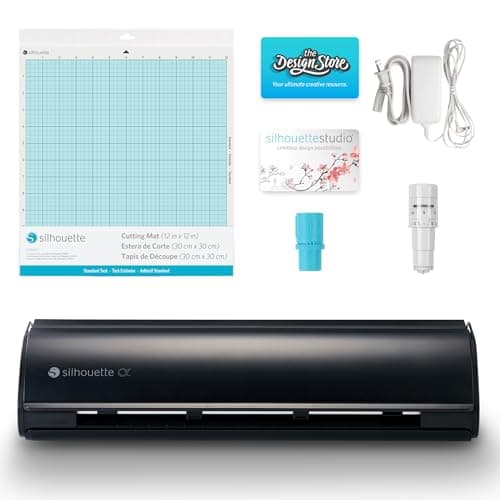
Silhouette America
Silhouette Cameo 5 Alpha: materials up to 3 mm
See price on Amazon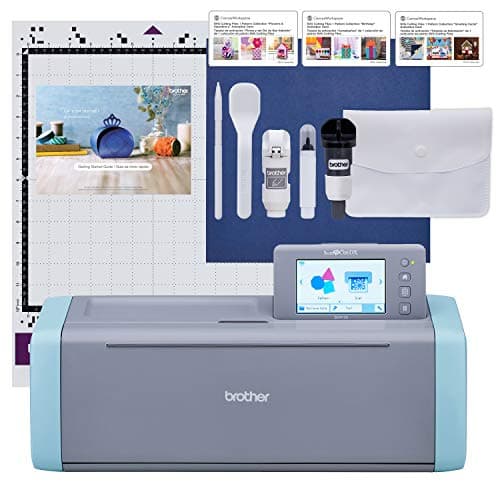
Brother
Brother ScanNCut SDX125E: built-in scanner, 3 mm cutting
See price on Amazon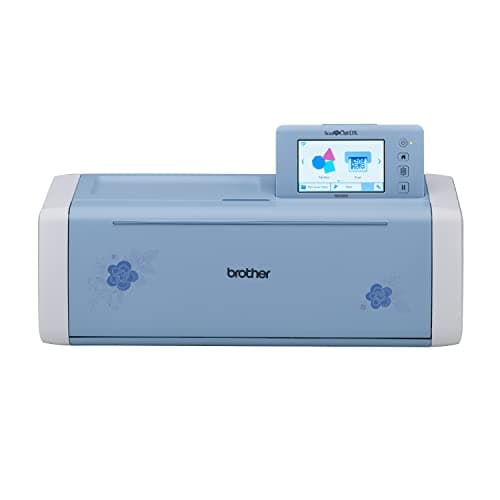
Brother
Brother SDX325: 3 mm with blade sensor
See price on Amazon
- Silhouette Cameo 5 Alpha: materials up to 3 mm
- Max material thickness
- 3 mm
- Max cut width
- Not stated
- Blades/tools
- AutoBlade; cuts, sketches and embosses
- Software
- Silhouette Studio
- Brother ScanNCut SDX125E: built-in scanner, 3 mm cutting
- Max material thickness
- 3 mm (0.1 in)
- Max cut width
- 12 x 12 in mat
- Blades/tools
- Auto blade with material sensor
- Software
- Standalone 5 in touchscreen, 682 built-in designs
- Brother SDX325: 3 mm with blade sensor
- Max material thickness
- 3 mm
- Max cut width
- Not stated
- Blades/tools
- Blade Sensor auto blade; Thin Fabric Auto Blade named
- Software
- On-screen editing, 5 in touch screen
| Pick | Max material thickness | Max cut width | Blades/tools | Software | Price | Link |
|---|---|---|---|---|---|---|
| Silhouette Cameo 5 Alpha: materials up to 3 mm | 3 mm | Not stated | AutoBlade; cuts, sketches and embosses | Silhouette Studio | - | Amazon |
| Brother ScanNCut SDX125E: built-in scanner, 3 mm cutting | 3 mm (0.1 in) | 12 x 12 in mat | Auto blade with material sensor | Standalone 5 in touchscreen, 682 built-in designs | - | Amazon |
| Brother SDX325: 3 mm with blade sensor | 3 mm | Not stated | Blade Sensor auto blade; Thin Fabric Auto Blade named | On-screen editing, 5 in touch screen | - | Amazon |
Facts are taken from each Amazon listing. Prices are checked daily and shown with their date.
Verdict
Quilters, sewists and anyone who draws by hand should buy a Brother ScanNCut, the SDX125E for value or the SDX325 for its fabric blade and larger design library. Vinyl, HTV and sticker makers who design on a computer should buy the Silhouette Cameo 5 Alpha.
These two machines solve the same problem in different ways. The Brother ScanNCut is a standalone cutter with a built-in scanner and touch screen, so you can scan a drawing or fabric print and cut around it on the machine itself. The Silhouette Cameo is driven from Silhouette Studio on a computer and is built around roll feeding and dual tools. This page is for quilters, sewists, paper crafters and vinyl makers trying to pick one. We compare workflow, fabric handling, stickers, spec facts from current listings and who should buy which. Cricut buyers comparing brands can also read Silhouette Cameo vs Cricut.
Two different ways of working
With a ScanNCut, the machine is the workstation. You choose a built-in design or scan something on the touch screen, resize it, and cut. The SDX125E listing states it is the only cutting machine series with a built-in scanner, and that it converts a scanned drawing to a cut file and can cut printed stickers directly. You can also add designs by USB or wireless connection.
With a Cameo, the computer is the workstation. You design in Silhouette Studio, send the job by USB or Bluetooth, and the machine cuts. It reads printed registration marks for Print and Cut rather than scanning the page. That suits people who already design on a computer or buy SVG files.
Neither approach is better in general. Pick the one that matches where you want to do your design work.
Spec table from listings
Other listed details: the SDX125E has a 5 inch touch screen and an auto blade that senses material thickness, and comes with a 12 x 12 inch standard tack mat. The SDX325 lists a Thin Fabric Auto Blade, Blade Sensor Technology, a 5 inch color LCD touch screen and wireless network connection. The Cameo 5 Alpha lists speeds up to 400 mm/s, Intelligent Path Technology and the AutoBlade.
| Model (listing) | Scanner | Max thickness stated | Built-in designs | Listed price |
|---|---|---|---|---|
| Silhouette Cameo 5 Alpha | No, 4-point registration for Print and Cut | Up to 3 mm | None stated | $299.00 |
| Brother ScanNCut SDX125E | Yes, built in | Up to 3 mm | 682 incl. 100 quilting patterns, 9 fonts | $449.99 |
| Brother ScanNCut DX SDX325 | Yes, built in | Up to 3 mm | 1,303 incl. 140 quilt patterns, 17 fonts | $899.99 |
Note.Prices are listing prices at the time of writing and change often.
Fabric, quilting and applique
This is where the ScanNCut stands out. The SDX325 listing describes cutting fabric for quilting and raw edge applique with the Thin Fabric Auto Blade and cutting multiple pieces at once, and both ScanNCut models ship with quilt patterns built in. Scanning lets you cut around a printed fabric motif or line up cuts on a fabric scrap precisely, which is hard on any computer-driven cutter.
The Cameo cuts fabric too, usually with a stabilizer or backing and the right blade, and the Cameo 4 and later support additional tools in the second carriage. For quilters who cut many raw fabric pieces, the ScanNCut's fabric focus is the stronger fit. Our best cutting machines for fabric guide compares the options, including Cricut's Maker.
Vinyl, HTV and stickers
For vinyl decals and iron-on, the Cameo is easier to live with. It has a built-in roll feeder and cross cutter, so long decals and shirt transfers come straight off a roll, and Silhouette Studio handles text, welding and layout well. The ScanNCut cuts vinyl on a mat, which works fine for sheet-sized jobs.
For stickers, both work. The Cameo uses Print and Cut with registration marks, and the Cameo 5 Alpha listing highlights 4-point registration with vertical and horizontal correction. The ScanNCut scans the printed sheet and cuts around the images. See best cutting machines for stickers and best cutting machines for vinyl decals for how each compares to other brands.
Hand-drawn and scanned designs
If you draw by hand, the ScanNCut is the direct route: draw with a marker, scan, and cut. It also suits stamping, kids' drawings and tracing shapes from existing templates without a computer.
On a Cameo you scan or photograph the drawing, bring it into Silhouette Studio and use the trace tool to make cut lines. That works well and gives more editing control, but it takes more steps and needs a computer.
Software and settings
The ScanNCut does most of its editing on the machine, with optional software for the computer. The Cameo depends on Silhouette Studio, which has a free edition and paid upgrades; Silhouette Studio editions explained covers what each adds.
Blade settings differ too. The ScanNCut's auto blade senses thickness, so there is little to set; always run a trial cut, as the listing itself advises. On the Cameo, the AutoBlade depth is set from Studio's material list: lower for thin vinyl and higher for cardstock, per the cut settings finder. For setup steps, see how to set up a Silhouette Cameo.
Frequently asked questions
Does the ScanNCut need a computer? No. It works standalone with its touch screen, built-in designs and scanner, and can also take designs over USB or wireless.
Can the Silhouette Cameo scan? No. It reads printed registration marks for Print and Cut, but it does not have a scanner.
Which is better for quilting? The ScanNCut, thanks to built-in quilt patterns, fabric blades and scanning of fabric.
Which is better for a vinyl shirt business? The Cameo, because of roll feeding, the cross cutter and Studio's design tools.