Comparison
Cricut AutoPress vs EasyPress 3
Published
Short answer
The EasyPress 3 is a handheld press: you supply the pressure, and it suits occasional shirts, bags and odd-shaped items. The AutoPress is a clamshell-style press that sets its own pressure and presses hands-free; the current AutoPress 2 listing states a 15 x 15 inch plate, up to 220 lbs of pressure and up to 410 F. If you press a few items a month, the EasyPress is enough. If you press in batches or sell shirts, the AutoPress saves effort and gives repeatable results.
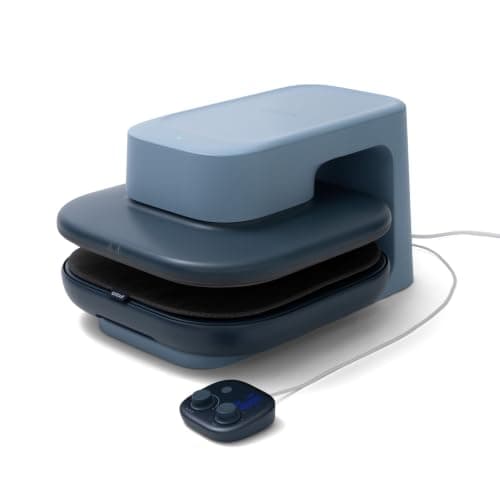
Cricut
Cricut AutoPress 2 15x15: 220 lbs, 410°F, Bluetooth
See price on Amazon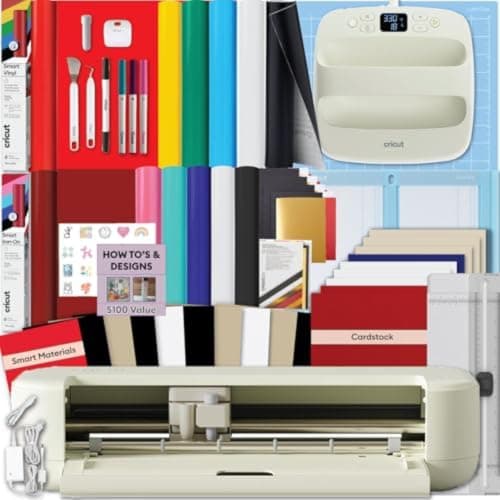
Cricut
Cricut Explore 5 + EasyPress 9x9: 12 in cutter and press
See price on Amazon
- Cricut AutoPress 2 15x15: 220 lbs, 410°F, Bluetooth
- Cricut Explore 5 + EasyPress 9x9: 12 in cutter and press
| Pick | Price | Link |
|---|---|---|
| Cricut AutoPress 2 15x15: 220 lbs, 410°F, Bluetooth | - | Amazon |
| Cricut Explore 5 + EasyPress 9x9: 12 in cutter and press | - | Amazon |
Facts are taken from each Amazon listing. Prices are checked daily and shown with their date.
Verdict
Get an EasyPress if you press a few items a month or work on bags, hats and odd shapes. Get the AutoPress 2 if you press in batches or sell shirts, because its automatic pressure up to 220 lbs and 15 x 15 inch plate give the same result on every shirt with less effort.
Cricut sells two very different kinds of heat press. The EasyPress line is handheld, like a flat iron with an accurate timer and even plate. The AutoPress is a full-size automatic press that closes, presses and opens for you. This page is for Cricut owners choosing a press for iron-on and Infusible Ink, and for hobbyists turning into small sellers. Our catalog carries the Cricut AutoPress 2, the current AutoPress listing on Amazon, so that is the AutoPress model described here. It does not carry the EasyPress 3 as a standalone item; the closest listing is the Explore 5 bundle that includes an EasyPress SE 9x9, so the EasyPress 3 is described in general terms without listing specs.
Handheld versus automatic
With an EasyPress 3 you set the temperature and time, place the hot plate on the design, and press down by hand for the full time. It heats evenly and has a clear timer, which is a big step up from a household iron. Because it is handheld, it goes onto shapes a flat press cannot reach, such as tote bag corners, pillow covers and items too thick for a clamshell.
The AutoPress closes onto the item with its own pressure. The AutoPress 2 listing describes hands-free operation in Auto Mode, adjustable pressure up to 220 lbs, edge-to-edge even heat up to 410 F, and automatic adjustment for thicker items up to 1.8 in. You load the shirt, start the press and step away to weed the next design. Our EasyPress vs clamshell heat press page explains the press types more broadly.
Spec table
The AutoPress 2 listing also lists compatibility with DTF, iron-on including Puff Iron-On, Infusible Ink and sublimation products, and an interactive Heat Guide. The Explore 5 bundle listing describes the included EasyPress 9x9 as delivering consistent heat for iron-on on T-shirts, sweatshirts, totes and bodysuits.
| Model | Plate | Pressure | Max temperature | Presets and app | Listed price |
|---|---|---|---|---|---|
| Cricut AutoPress 2 | 15 x 15 in | Adjustable, up to 220 lbs, automatic | 410 F | 4 customizable presets, Bluetooth to mobile app | $297.48 |
| EasyPress SE 9x9 (in Explore 5 bundle) | 9 x 9 in per bundle name | By hand | Not stated | Not stated | $469.99 with Explore 5 and materials |
| EasyPress 3 | Several sizes | By hand | Check Cricut's spec page | Connects to the Cricut Heat app | Not in our catalog |
Note.Prices are listing prices at the time of writing. The bundle price includes a cutting machine and materials, not just the press.
Settings are the same on both
The transfer material decides the settings, not the press. The site's heat press settings tool uses manufacturer instructions, for example: Siser EasyWeed on cotton or poly blends at 305 F for 10 to 15 seconds with medium pressure; Cricut Everyday Iron-On with an EasyPress on 100 percent cotton at 315 F for 30 seconds, then 15 seconds on the back, warm peel; Cricut Infusible Ink on a Cricut T-shirt blank at 385 F for 40 seconds with light pressure.
The difference is consistency. With a handheld press, pressure depends on you and the table height. With the AutoPress, the pressure is the same on every shirt. Pre-press the blank for about 5 seconds to remove moisture on either press, and if the vinyl's label differs from a chart, follow the label. See the Cricut heat press temperature guide for more materials.
| Transfer | Temperature | Time | Pressure | Peel |
|---|---|---|---|---|
| Siser EasyWeed | 305 F | 10 to 15 s | Medium | Hot or cold |
| Siser EasyWeed Stretch | 300 F | 10 to 15 s | Medium | Hot |
| Siser Glitter | 320 F | 15 to 20 s | Firm | Hot or cold |
| Cricut Everyday Iron-On (EasyPress, cotton) | 315 F | 30 s, then 15 s on back | Firm by hand | Warm |
| Cricut Infusible Ink (Cricut T-shirt blank) | 385 F | 40 s | Light | Per instructions |
How many shirts a month?
Volume is the clearest way to decide. Holding a handheld press for each shirt, and again on the back, is fine for a few items. Pressing a batch of team shirts or a weekend market order by hand is tiring, and pressure tends to drift as you get tired, which is a common cause of peeling transfers.
The AutoPress lets you prep the next shirt while one presses and keeps pressure consistent across the batch. Its 15 x 15 inch plate also covers large adult designs in one press, where a smaller handheld plate may need overlapping presses.
- A few gifts or personal shirts each month: EasyPress
- Hats, totes, pillows and odd shapes: EasyPress, or keep one alongside an AutoPress
- Regular batches, team orders or an online shop: AutoPress
- Large designs on adult sweatshirts and blankets: AutoPress for the 15 x 15 inch plate
Space and safety
A handheld press stores on a shelf and comes out when needed. Use it on a firm, heat-safe surface at a height where you can push down, not on a soft ironing board. Always set it on its safety base, not face down.
An automatic press is a bigger, heavier appliance that needs a permanent spot on a sturdy table with clearance around the platen. Keep children and pets away from either press, and let it cool before moving it. If you are not sure you need a press at all yet, read do you need a heat press for Cricut. For other brands, the best heat presses for T-shirts guide includes auto presses from HTVRONT and VEVOR.
Frequently asked questions
Can the AutoPress do Infusible Ink? Yes. The AutoPress 2 listing lists Infusible Ink, iron-on, DTF and sublimation products as compatible.
Is the EasyPress 3 good enough for selling shirts? For small numbers, yes, if you press firmly and follow the settings. For regular batches, an automatic press is faster and more consistent.
Do I need the Cricut app for either press? No. Both can be set on the machine. The app adds guided settings and lets you send settings by Bluetooth.
What size EasyPress should I get? Match the plate to your most common design. A plate smaller than the design means overlapping presses, which can leave uneven areas.
What you need for this
- See price on AmazonAmazon
Cricut AutoPress 2 15x15: 220 lbs, 410°F, Bluetooth
From Best auto-open heat presses, from Cricut AutoPress to 16x24 shop models
- See price on AmazonAmazon
Cricut Explore 5 + EasyPress 9x9: 12 in cutter and press
From Best cutting machines for making T-shirts with iron-on and HTV